Creating and destroying Network Objects
VIROO provides the necessary tools for managing network objects. This section covers the essential concepts of creating and destroying network GameObjects in VIROO.
If GameObjects are instantiated with Unity's own methods (Instantiate function), they will be created individually for each of the users. To get GameObjects instantiated for all the users of the session, with their attributes synchronized, it's necessary to create them as explained in this article.
Create Network Object
A networked object can be created in VIROO in two different ways:
- Using the CreateObjectAction component.
- By code making a custom Script.
In both cases, the prefab that's to be instantiated should be registered in a Prefab Instantiable Container.
Prefab Instantiable Container
Add a PrefabInstantiableContainer component to any GameObject in your scene. Add your prefab to the Instantiable Elements list and assign and Id to it.
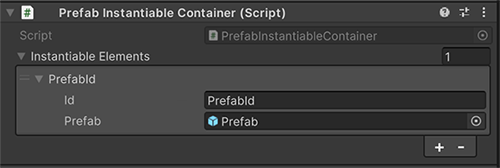
Using CreateObjectAction
VIROO provides you with an action so that you can instantiate GameObjects across the network in a synchronized manner. For more information go to Create Object Action.
Custom Code
The following explains how to instantiate a prefab over the network from code. In the script that will be used to instantiate the prefab, you must inject the necessary services to create objects across the network, in this case, INetworkObjectsService.
private INetworkObjectsService networkObjectsService;

protected void Inject(INetworkObjectsService networkObjectsService)
{
    // The INetworkObjectsService is stored for later use
    this.networkObjectsService = networkObjectsService;
}

protected void Awake()
{
    // This method call will trigger the Inject method to be called
    this.QueueForInject();
}
Then, to create the GameObject, just need to use the CreateDynamicObject method.
UnityCreateSingleSessionObjectResponse createSessionObjectResponse = await networkObjectsService.CreateDynamicObject(
    objectId, // The id of the prefab to instantiate
    transform.position,
    transform.rotation,
    requestAuthority: true, // Wether the creator of the object should be given authority over the object automatically
    isPersistent: true, // If set to false, the object will be automatically destroyed when its creator disconnects
    SceneManager.GetActiveScene().name);
Tip
As the action of creating the object is already produced automatically by the network, it's important that the create object method is only executed on a single client. For this, you can use the Authority or you can look at who is the first user in the session using ISessionClientsProvider interface.
if (sessionClientsProvider.SessionClients.First().IsSelf)
{
  // Do stuff
}
If the object you want to create doesn't have a NetworkObject, the system will add it automatically, since it's a necessary component to identify the network objects.
Finally, accessing the created object can be done through the response obtained from the CreateDynamicObject method.
if (createSessionObjectResponse.Success)
{
    NetworkObject createdNetworkObject = createSessionObjectResponse.InstantiatedObject.GameObject.GetComponent<NetworkObject>();
}
Tip
Consider that since the reference to the GameObject is being obtained from the return value of the CreateDynamicObject method, this changes will only occur in that user's VIROO Application. For example, if a component is added by code to that GameObject, only the local player that called the method will have that component added to the GameObject. To make changes in all user Applications, consider using other synchronization methods supplied by VIROO, like Actions.
Destroy Network Object
Destroying a networking object can be done by code, using the same interface that's used to create networking objects, INetworkObjectsService.
To do so, inject the necessary services to create objects across the network, in this case, INetworkObjectsService.
private INetworkObjectsService networkObjectsService;

protected void Inject(INetworkObjectsService networkObjectsService)
{
    // The INetworkObjectsService is stored for later use
    this.networkObjectsService = networkObjectsService;
}

protected void Awake()
{
    // This method call will trigger the Inject method to be called
    this.QueueForInject();
}
Then, to destroy the network GameObject object, use the DestroyObject method. To do this, a reference to the NetworkObject of the object to be destroyed is needed.
private async Task DestroyNetworkObject(NetworkObject networkObject)
{
    await networkObjectsService.DestroyObject(networkObject);
}