Create Object Action
With this action, objects can be created over the network.
The next steps should be followed to setup a Create Object Action:
Create a
PrefabGameObject that you want to create dynamically.Then, create a new
GameObjectand add a PrefabInstantiableContainer component to it.The next step is to setup this component. Add a new entry to the
Instantiable Elementslist, drag your prefab and assign an Id to it.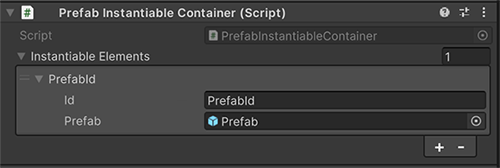
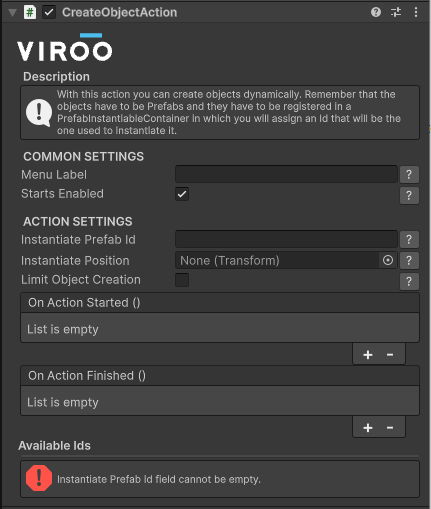
Finally, create another GameObject and assign the component CreateObjectAction to it, and configure it so that when it's executed, it creates the Prefab that was assigned to it.
| CreateObjectAction | |
|---|---|
| Field | Description |
| Menu Label | If this action is added together with a ShowMenuAction, this is the name that will appear on the menu. |
| Starts Enabled | If the action should be enabled from the beginning, this checkbox must be enabled, otherwise the action won't be executed. |
| Instantiate Prefab Id | This is the Id of the Prefab with which it has been identified in the PrefabInstantiableContainer. |
| Instantiate Position | This is the position and rotation in which the Prefab will be instantiated. if one isn't assigned, the position and rotation will be those of the Transform itself. |
| Limit Object Creation | By checking this checkbox it's possible to limit the number of objects that can be created using this action. |
| On Action Started | UnityEvent that will be called when before the object creation action starts. |
| On Action Finished | UnityEvent that will be called when after the object creation action finished. |