NetworkTransform & NetworkTransformHierarchy
VIROO's NetworkTransform component is a fundamental component for the synchronization of transforms. It is responsible for replicating the position, rotation and scale of a Unity Transform from one client to another, ensuring that all players see the same representation of the object in the game. The NetworkTransform is a NetworkBehaviour.
Synchronize Transform
To synchronize a Transform you need to add the following components:
- NetworkObject: VIROO Networking component. This component may be at the same level as the NetworkTransform, or it may be in any parent in the hierarchy.
- NetworkTransform: VIROO Networking component.
- NetworkTransformSettings: VIROO Networking component.
NetworkObject
Used to uniquely identify a GameObject. For more information view NetworkObject.
NetworkTransform
The main component used to synchronize a Transform through the Network.
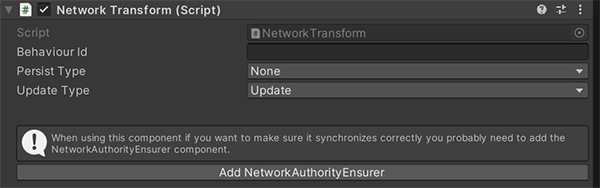
| NetworkTransform | |
|---|---|
| Field | Description |
| Behaviour Id | The identifier of the Behaviour. It is automatically assigned. |
| Persist Type | Here you can specify what kind of persistence you want the NetworkTransform to have between None, Last or All, where None is no persistence, Last is the last values set to the transform and All is all values set to the transform. The value for this component should be Last. For more information view Persistence. |
| Update Type | Here you can choose in which Unity update cycle you want the NetworkTransform to run: Update, FixedUpdate or LateUpdate. |
NetworkTransformHierarchy
Like the NetworkTransform component, the NetworkTransformHierarchy is in charge of synchronizing the position, rotation and scale of a Transform in Unity, the difference is that the NetworkTransformHierarchy synchronizes the Transform in which it is assigned and also all its children in the hierarchy.
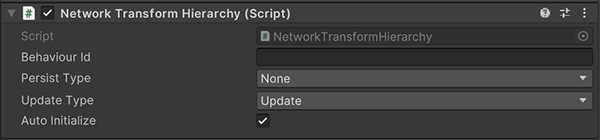
| NetworkTransformHierarchy | |
|---|---|
| Field | Description |
| Behaviour Id | The identifier of the Behaviour. It is automatically assigned by the system. |
| Persist Type | Here you can specify what kind of persistence you want the NetworkTransform to have between None, Last or All, where None is no persistence, Last is the last values set to the transform and All is all values set to the transform. The value for this component should be Last. For more information view Persistence. |
| Update Type | Here you can choose in which Unity update cycle you want the NetworkTransform to run: Update, FixedUpdate or LateUpdate. |
| Auto Initialize | If checked, the component will synchronize all the transforms in its hierarchy. If this property is not checked, instead of automatically finding getting references to the transforms in its hierarchy, the list of specific Transforms to synchronize must be specified by scripting to the component. |
NetworkTransformSettings
This component is used in conjunction with NetworkTransform and NetworkTransformHierarchy, and is used to configure their behaviour.
In the case of the NetworkTransform component, the NetworkTransformSettings has to be set in the same GameObject where the NetworkTransform is located.
In the case of the NetworkTransformHierarchy component, the NetworkTransformSettings has to be set in the same GameObject where the NetworkTransformHierarchy is located. Additionally, NetworkTransformSettings components can be set in each of the transforms in the hierarchy that is being synchronized in order to establish different values for that specific Transform.
If no additional NetworkTransformSettings is found in specific Transforms, the settings set in the NetworkTransformSettings in the same GameObject as the NetworkTransformHierarchy are used by default.
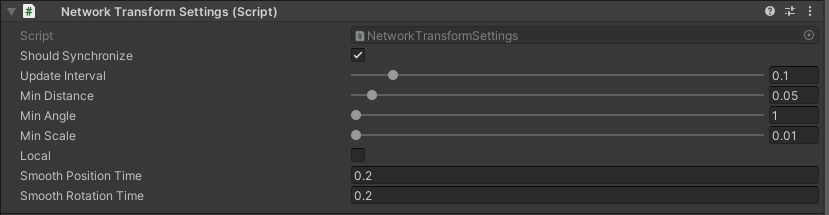
| NetworkTransformSettings | |
|---|---|
| Field | Description |
| Should Synchronize | This field is used to indicate whether or not the Transform that has this component is going to be network synchronized. It is very useful to indicate, within a hierarchy synchronized by a NetworkTransformHierarchy, if we do not want a specific Transform to be synchronized, unchecking this field. |
| Update Interval | Indicates how often, in seconds, the script will check if the conditions to consider that the transform has changed are met. |
| Min Distance | This is the minimum distance in meters the Transform has to move to send a new position update. |
| Min Angle | This is the minimum angle that the Transform has to rotate to send an update of its rotation. |
| Min Scale | This is the minimum value in meters that the scale has to change to send a new update. |
| Local | This field is used to indicate whether the Transform synchronization is to be performed in Local or Global space. |
| Smooth Position Time | This is the amount of smoothing applied when interpolating the current position with the target position in the users receiving the transform data. |
| Smooth Rotation Time | This is the amount of smoothing applied when interpolating the current rotation with the target rotation in the users receiving the transform data. |