Interface
VIROO Single Player is simple and intuitive, designed to help users create or join immersive sessions seamlessly.

Sessions are real-time, application-based immersive experiences via a unique Session ID.
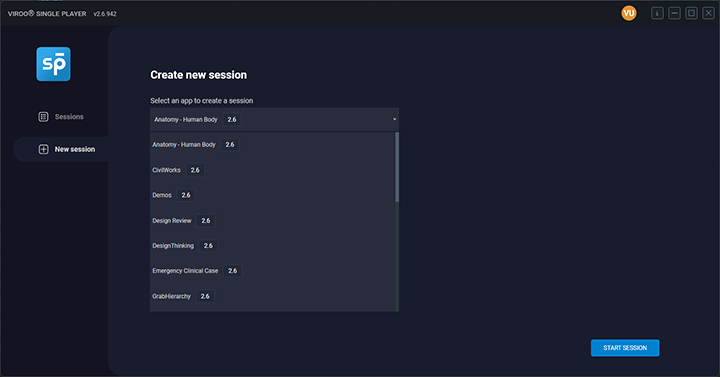
Create a session
To create a session, select your desired application from the drop-down menu and click Start Session.
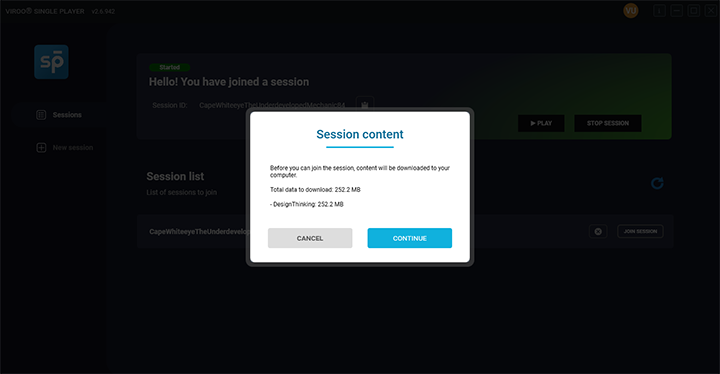
If this is the first time you're using the application or if updates are available, the system may prompt you to download or update the app.
Once the Session is created, it's ready for others to join.
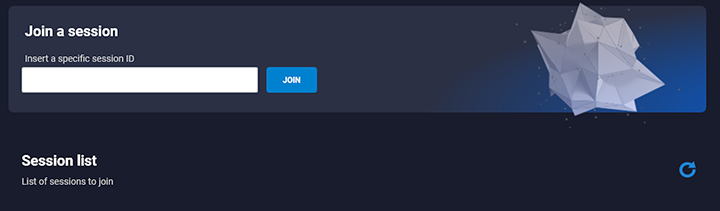
Join a session
Users who create sessions will automatically join them and the Play option will be shown.
You can also select an active session from your organization's Session List. Additionally, you can share Session IDs using the clipboard feature.
[!INFO]
You can join sessions across different organizations by entering the Session ID, provided that both organizations have access to the same app.

Just click Play, then select your desired Session Options to launch your immersive experience.
VIROO Single Player offers two modes: XR Headset and Keyboard and Mouse (desktop).
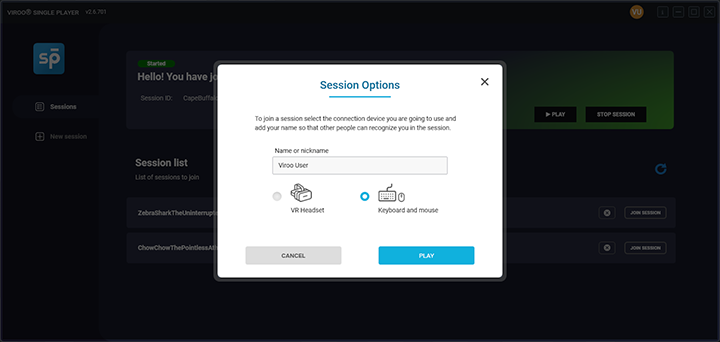
Once launched, users are connected to the Session and Application. Navigation depends on the launch mode: XR Headset or Keyboard and mouse.

Stop or Leave a Session
There are different ways to exit or end a session, depending on your role and the level of disconnection required:
Stop: Exits the immersive experience but keeps you connected to the session. Use this if you just want to pause or leave the immersive experience temporarily without fully disconnecting.
Stop Session: If you are the session creator, this will end the session for all participants.

- Leave Session: Available to users who joined a session created by someone else. This will disconnect you from the session entirely, and you will need to rejoin to participate again.

To end the session while in desktop mode, click on the X button at the bottom left corner to return to VIROO Single Player. Then, press Leave Session.
Tip
- Use the clipboard option to share Session IDs with coworkers.
- Remember, the creator is able to Stop a session (Stop option to close the experience and Stop Session for ending it for everyone) and other users are able to Leave the session.
- Refreshing the Session list may help during high workload periods.