Single player proxy settings
Proxy-aware applications can detect proxy settings automatically or enable users to configure them manually. This capability helps all network communications (authentication, data exchange, streaming) are correctly routed through the proxy server.
Both the .NET-based VIROO Players and the Unity-based VIROO Applications are proxy-aware components. This means they're designed to recognize and work with proxy servers, which are often used in corporate and institutional networks to manage and secure internet traffic.
Both Player and Applications require the Don't use the proxy server for local (intranet addresses) option to be enabled at the OS-level proxy configuration. If using an XR Headset, the streaming from XRPC to the headset would attempt to pass through the proxy, which isn't ideal.
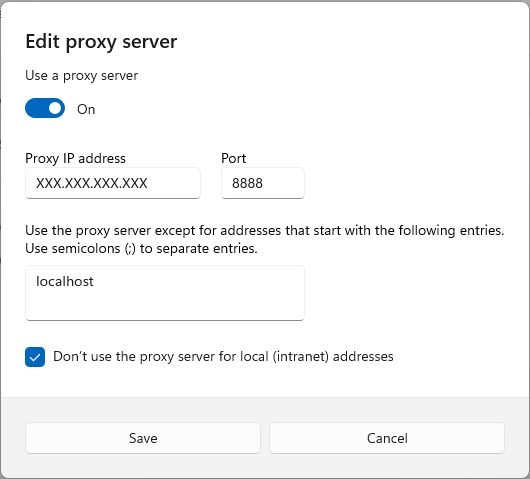
Configure proxy settings manually
Although VIROO components are Proxy-aware, manual intervention could be required to set up or adjust other parameters in client XRPCs.
Corporate and institutional networks often involve proxy-enabled scenarios.
Locate and edit settings file: Player and Application have their respective appsettings configuration files on the users computer.
- Single Player
%APPDATA%\Viroo\player\2.6\appsettings.json - Room Player
%APPDATA%\Viroo\controlPanel\2.6\appsettings.json
{
    "Communication": {
        "Proxy": {
            "Credentials": {
                "UserName": "",
                "Password": ""
            },
            "Uri": "PROXY ADDRESS",
            "ByPass": [],
            "BypassProxyOnLocal": true
        }
    }
}
Application -
%APPDATA%\Viroo\client\2.6\appsettings.json
{
    "Viroo": {
        "Communication": {
            "Proxy": {
                "Credentials": {
                    "UserName": "",
                    "Password": ""
                },
                "Uri": "PROXY ADDRESS",
                "ByPass": [],
                "BypassProxyOnLocal": true
            }
        }
    }
}
Other proxy considerations
VIVOX Voice Communication proxy awareness can only be configured at OS level in a Microsoft Windows XRPC. To set the appropriate parameters at the Application level, edit the appsettings file as follows:
{
    "Vivox": {
        "UseOsProxySettings": true
    }
}
Network Transport Configuration in VIROO uses a bitmask to specify one or more transport options, defining how clients should communicate in specific network scenarios.
A bitmask combining one or more values that specify what transports the client should use. To support WebSockets (1) and LongPolling (4) the value should be 5 (1 + 4).
None (0) Specifies that no transport is used.
WebSockets (1) Specifies that the web sockets transport is used.
ServerSentEvents (2) Specifies that the server sent events transport is used.
LongPolling (4) Specifies that the long polling transport is used.
{
    "Viroo": {
        "Communication": {
            "Transports": 5
        }
    }
}
More information: Configure allowed transports - Microsoft Documentation.